
Dell Adapter USB 3.0 to Ethernet
Photo(s)
Detailed information
Overview
The Dell USB 3.0 to Ethernet adapter enables you to add an Ethernet port to your computer or desktop using an existing USB input. Supporting up to Gigabit Ethernet data speeds, the adapter lets you enjoy faster streaming of online content, from news and live sports outlets to streaming radio and entertainment sites playing your favorite television shows and movies. The adapter contains a built-in driver for easy setup, eliminating the need to install drivers from a CD or download them from another source.
Adapter converts USB 3.0 to Ethernet
For faster streaming and network connectivity, the Dell USB 3.0 to Ethernet adapter enables you to add an Ethernet port using an existing USB input on your computer or desktop. A handy addition for users looking to expand or add networks, the adapter lets you establish a new connection or connect to another network without requiring a router or switch.
Ethernet adapter enables connectivity
This simple, innovative Ethernet adapter from Dell allows you to extend your device's bandwidth by establishing a new Internet connection. As long as your device is equipped with a USB input, this compact adapter ensures seamless results. Best of all, it doesn't require replacing or adding a new network card. Use it to add another network, connect with another computer and enjoy videos and other streaming content faster.
Ensures fast streaming and downloads
The Dell USB 3.0 to Ethernet adapter supports up to Gigabit Ethernet data speeds, so you can enjoy faster streaming of online content, from news and live sports outlets to streaming radio and entertainment sites playing your favorite television shows and movies.
Contains built-in driver for convenient setup
The Dell USB 3.0 to Ethernet adapter contains a built-in driver for easy setup, eliminating the need to install drivers from a CD or download them from another source. The adapter saves you time by automatically prompting you to install the driver when you plug it in for the first time.
Compact size offers easy portability
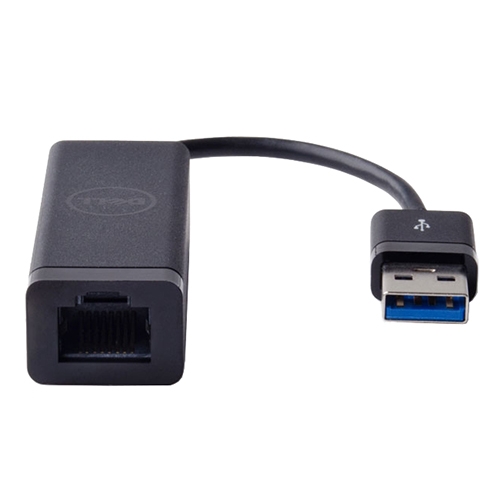
Measuring 6 x 0.8 x 0.6 (L x W x H) inches, this lightweight adapter is easy to use and keep handy. The adapter is fitted with a USB A on one end and an RJ-45 on the other, a standard fit for a variety of compatible devices.
What's in the Box
Dell USB 3.0 to Ethernet adapter.
Quality
- Dell Certified components undergo rigorous testing by qualified technicians to ensure their compatibility and reliability in Dell computers
- Continued qualification process provides testing and certification of the newest technology features in Dell computers
- Dell Certification means that you do not have to worry about the warranty for the computer hardware
Technical support
- For any questions regarding upgrade of certified components Dell will answer our experienced staff of technical support
- Dell does not support the components purchased from other sources
to download in PDF format